I screenmaxxed my desk setup by going from three to five displays — but they aren’t all monitors
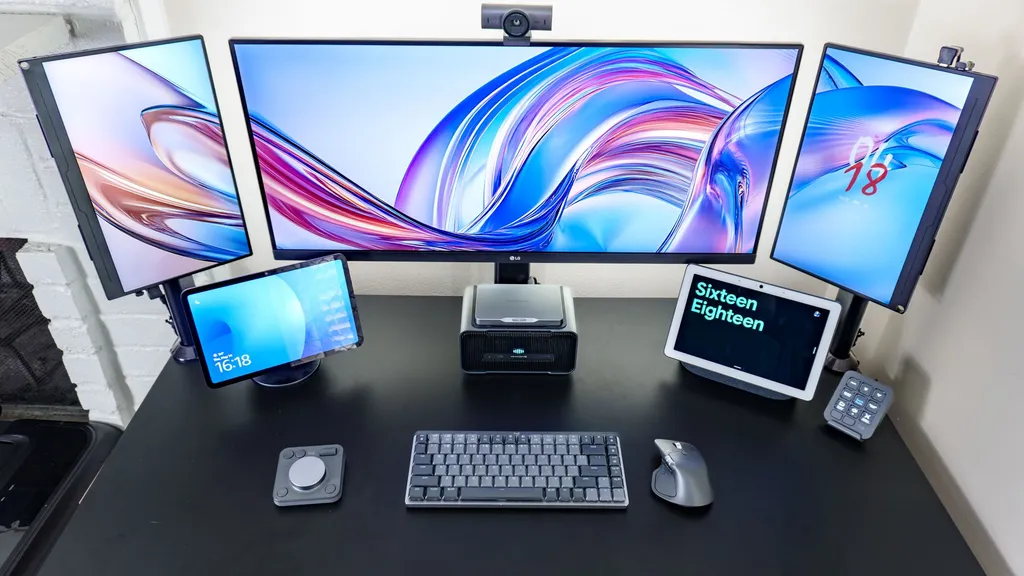
The author upgraded their desk setup from three to five displays, incorporating smart displays alongside traditional monitors for enhanced functionality. This 'screenmaxxed' configuration was tested as a final experiment before dismantling the current workspace. The combination included a 40-inch ultrawide monitor, portable screens, and voice-enabled smart displays.
- ▪The setup features a 40-inch ultrawide monitor as the central display.
- ▪Two smart displays were added to retain quick access to Alexa and Google Gemini.
- ▪A portable monitor was rotated vertically to match the height of the ultrawide screen.
- ▪The author previously used simpler single or dual-monitor configurations.
- ▪This five-display arrangement was a temporary experiment before a planned desk redesign.
Opening excerpt (first ~120 words) tap to expand
Home Smart Home I screenmaxxed my desk setup by going from three to five displays — but they aren’t all monitors Opinion By Anthony Spadafora published 16 May 2026 Taking my triple-monitor desk setup too far before I tear it all down When you purchase through links on our site, we may earn an affiliate commission. Here’s how it works. (Image credit: Tom's Guide) Copy link Facebook X Reddit Email Share this article 0 Join the conversation Follow us Add us as a preferred source on Google Newsletter Subscribe to our newsletter Even with a massive 40-inch ultrawide monitor on my desk, one screen just never seems to be enough — at least for me, anyway.
…
Excerpt limited to ~120 words for fair-use compliance. The full article is at Tom's Guide.
Discussion
0 commentsMore from Tom's Guide