How to use NameDrop to exchange iPhone contacts in seconds
NameDrop is a new feature introduced in iOS 17 that allows iPhone users to exchange contact information by bringing their devices close together. Users can customize what information is shared and troubleshoot common issues if the feature does not work as expected. The process is simple and secure, ensuring that users have control over their contact details during the exchange.
- ▪NameDrop allows iPhone users to exchange contact information by tapping their devices together.
- ▪Both devices need to be running iOS 17 or later with AirDrop enabled for NameDrop to work.
- ▪Users can customize their Contact Poster before sharing to ensure accurate information is exchanged.
Opening excerpt (first ~120 words) tap to expand
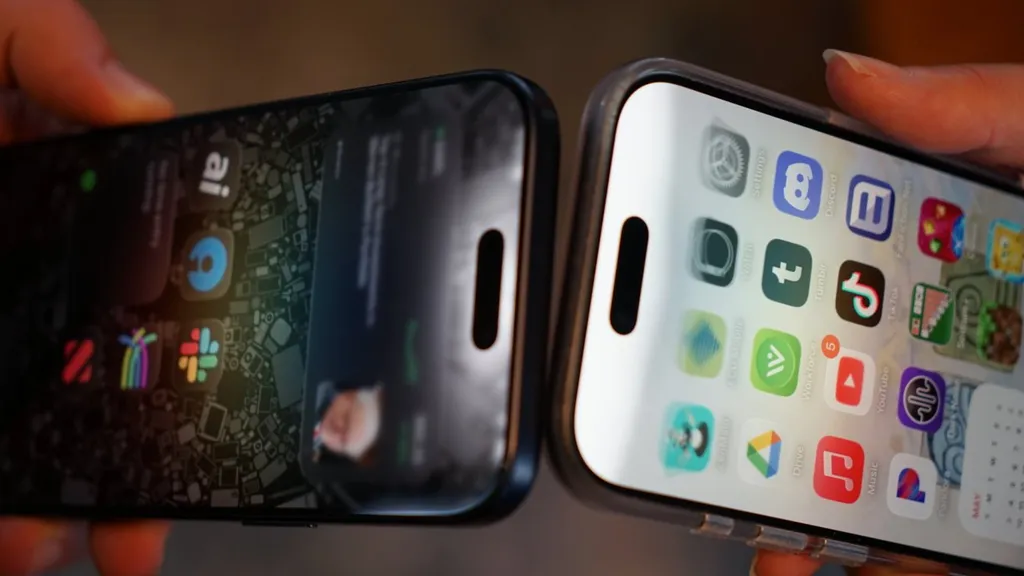
Tips How to use NameDrop to exchange iPhone contacts in seconds Andrew Orr 0 e-mail BlueSky Mastodon X Facebook Reddit Thu May 21 2026, 11:01 PM EDT · 5 minute read NameDrop causes a light and vibration to show between the two iPhones NameDrop lets iPhone users exchange contact information by bringing two devices together. Here's how to use the feature, customize what it shares, and fix the most common problems. Apple introduced NameDrop in iOS 17 as part of a larger contact-sharing system built around Contact Posters. Instead of typing phone numbers manually, users can tap their iPhones together and choose whether to share or receive contact information. It's a simple gesture that feels like magic, at least when it works.
…
Excerpt limited to ~120 words for fair-use compliance. The full article is at AppleInsider.
Discussion
0 commentsMore from AppleInsider