Apple hid a perfect 'dumb phone' feature inside your iPhone that's great for kids — here's how to turn it on
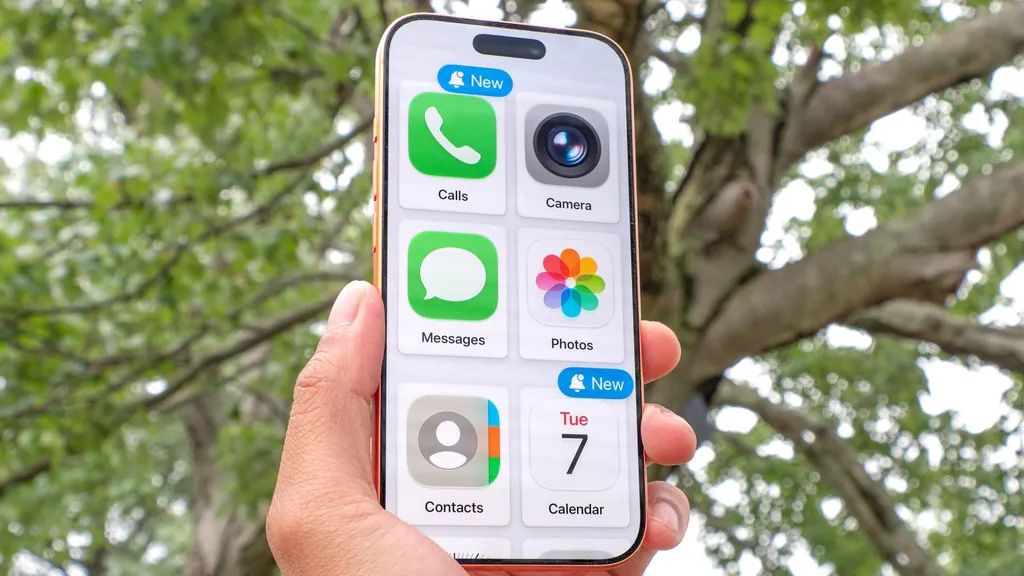
Apple’s iOS 17 includes an accessibility feature called Assistive Access that can turn an iPhone into a simplified, distraction‑free device. The mode removes most apps, disables web links, and restricts navigation to a selected set of core functions such as Calls, Messages, Maps, and Camera. Parents and users can enable it through Settings to create a “dumb‑phone” experience for children or for personal screen‑time reduction.
- ▪Assistive Access is built into iOS 17 as an accessibility tool for users with cognitive disabilities, but it also serves as a hidden “dumb phone” mode.
- ▪When activated, the feature displays only chosen apps, renders web links as inert text, and prevents users from exiting the simplified interface without a passcode.
- ▪To enable it, an iPhone XR or newer must go to Settings → Accessibility → Assistive Access, select allowed apps, choose a layout, and set a four‑digit passcode.
- ▪The mode is marketed as a way for parents to give children a safe, limited phone experience without needing a separate device or third‑party app.
Opening excerpt (first ~120 words) tap to expand
Phones Apple hid a perfect 'dumb phone' feature inside your iPhone that's great for kids — here's how to turn it on How To By Kaycee Hill Published 8 July 2026 This iPhone setting is a game-changer When you purchase through links on our site, we may earn an affiliate commission. Here’s how it works. (Image credit: Future) Copy link Facebook X Reddit Email Share this article 0 Join the conversation Follow us Add us as a preferred source on Google Newsletter Subscribe to our newsletter The desire to disconnect is growing, but finding the right balance can be difficult.
…
Excerpt limited to ~120 words for fair-use compliance. The full article is at Tom's Guide.
Discussion
0 commentsMore from Tom's Guide